Anthropic API Key
Anthropic (Claude) is only available in the PRO version.
Unlock this and other features by upgrading to Joomill Autolanguage PRO
Go PRO
Unlock this and other features by upgrading to Joomill Autolanguage PRO
Go PRO
An Anthropic API key lets you use models like Haiku, Opus or Sonnet for translations. You'll need an account, billing set up, and a generated key.
Step 1: Create an Anthropic account
- Go to the Anthropic Platform website.
- Click Sign up to create an account, or log in if you already have one. A paid Claude subscription (Pro, Max, Team or Enterprise) does not automatically give you API access, they're separate billing systems. Read more about this.
Step 2: Set up your workspace
Anthropic organizes projects into Workspaces, so you can manage different teams or billing environments separately.
- Check which workspace you're in using the dropdown menu at the top of the screen.
- The default workspace is usually called "Default".
Step 3: Access the API dashboard
- Once logged in, you'll be in the Platform dashboard.
- Go to the API keys section in the left sidebar, or directly to https://platform.claude.com/settings/keys.
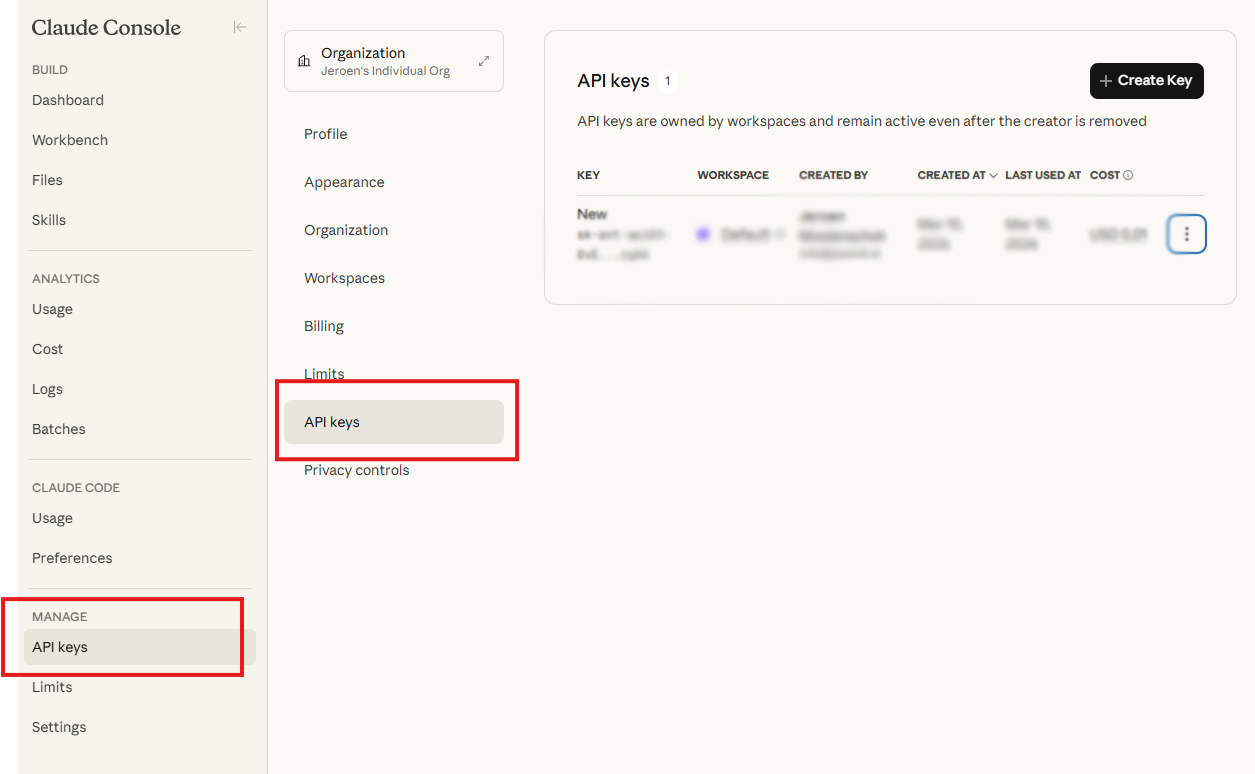
- Click "+ Create key".
- Select a workspace and give your key a name.
- Click Add.
- Save your secret key somewhere safe, you won't be able to view it again.
Step 4: Add the key to Joomla
- Log in to your Joomla backend.
- Go to System > Manage > Plugins and open System - Autolanguage.
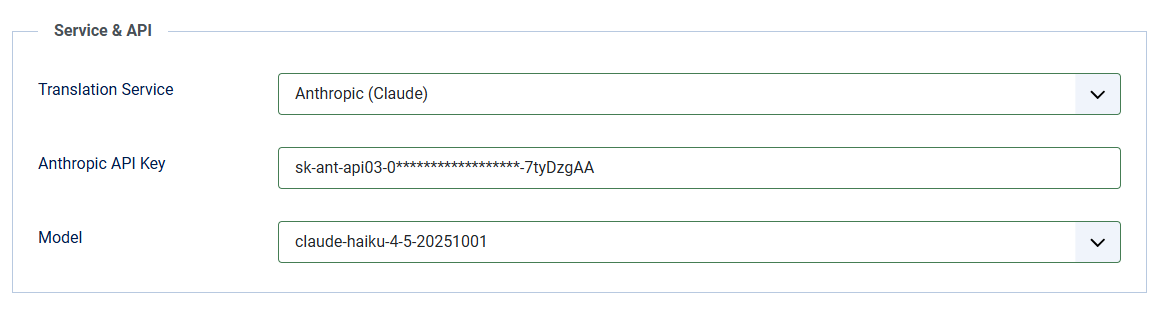
- Open the Service & API tab.
- Set Translation Service to Anthropic (Claude).
- Paste your key into the Anthropic API Key field.
- Save.
- After saving, select the model you want to use. See model pricing for the cost of each.
Running version 2.5.0? Update to 2.6.0 or later before you paste your key. An Anthropic key is 108 characters and the key field in 2.5.0 accepted only the first 99, cutting the key off as you pasted it without any warning, after which the service rejects it. If you already entered your key under 2.5.0, update the plugin and paste the key again: the update cannot repair a key that was already stored incomplete.
Known issue
"Your credit balance is too low to access the Anthropic API. Please go to Plans & Billing to upgrade or purchase credits."
If this error persists after topping up your account, the system may not have refreshed your existing keys. Go to Plans & Billing, confirm your credits are added, then delete your old API keys and generate a new one. The new key should restore access immediately.