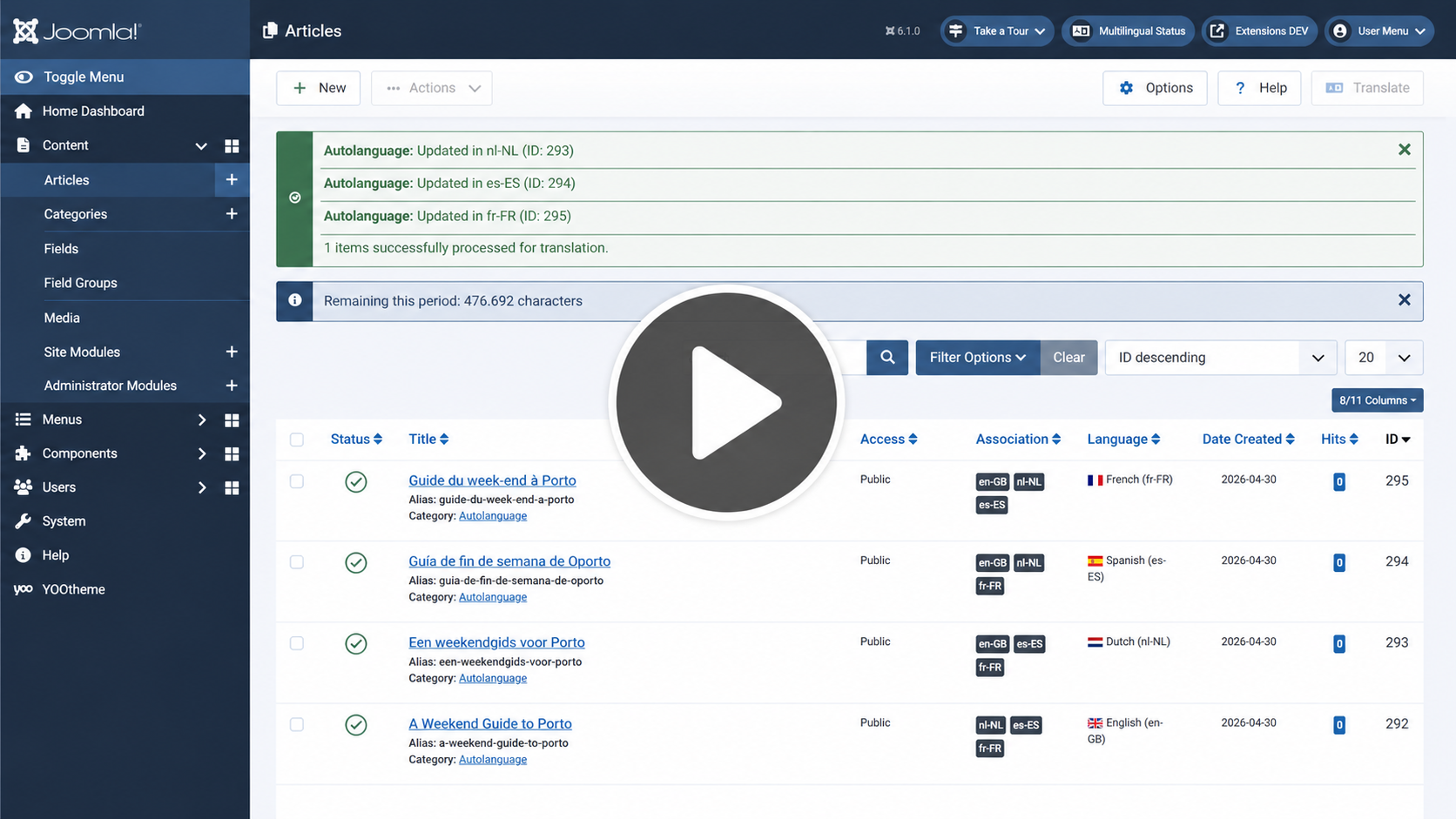
Turn Your Joomla Site Multilingual. Instantly.

Stop wasting hours manually copying articles, recreating menus, and fixing broken links. Joomill Autolanguage plugin clones, translates, and links your entire site structure automatically, the Joomla way just by clicking 'Save'.

Still translating Joomla the hard way?

Building a multilingual Joomla site usually means doing everything twice. You copy the article. You paste the text into Google Translate. You copy it back. Then you have to manually associate the two articles. Then you have to recreate the menu item. Then you have to fix the internal links. It’s a repetitive, error-prone cycle that kills your productivity.

The One-Click Revolution

With Joomill Autolanguage plugin, you simply write your content in your main language and hit Save. That’s it. Our plugin works in the background to clone your content, translate it using premium AI (DeepL/OpenAI), and most importantly, automatically set up all the complex Joomla associations for you. It’s like having a full-time translation team inside your CMS.

More Than Just Text

Most plugins just translate articles. We go deeper. Joomill Autolanguage plugin automatically clones and translates Categories, Menu Items, Custom HTML Modules, Tags and even Mail Templates. It preserves your entire site structure, ensuring that a nested menu in English is perfectly replicated as a nested menu in Dutch, French, or Spanish.

No More Broken Links

This is a game-changer. If your original article links to your 'Contact' page, our plugin detects that link during translation. It automatically rewrites the link in the translated version to point to the translated 'Contact' page. No more 404 errors, zero manual fixing required

Rank in Every Language

We don't just translate the body text. We handle the critical SEO fields that others miss: Browser Page Titles, Meta Descriptions, Meta Keywords, and URL Aliases (Slugs). We even translate Image ALT tags and Captions to ensure your images rank in local search results.

Native Joomla Associations

We use Joomla's native association system. This means your language switcher works perfectly out of the box. No proprietary lock-in, no hacky overrides. Just clean, standard Joomla database entries that interact perfectly with other plugins and templates.

Nested Tags Translation

Do you use a complex Tag tree? We support it. When you save an item, we check if the tags are already translated. If not, we clone the tag, translate the title and description, maintain the parent/child relationship, and associate it with the content. Automatically.

Seamless Workflow

The plugin hooks directly into the standard Joomla 'Save' action. There is no new interface to learn. You simply work as you always have. Need to update an article? Just save it again, and you can choose to update all translations automatically or keep them as they are.

The Engines

The world's most accurate machine translation. Includes support for 'Formality' settings (Formal/Informal) to match your brand voice.

Harness the power of LLMs. Choose any available model for context-aware translations that sound truly human.

The industry standard for speed and broad language support. Perfect for translating into hundreds of languages instantly.

Enterprise-grade translation reliability. Great for high-volume sites with a generous free tier.

Core Version (Free)

Translation Drivers: Google, Microsoft

  • Translate Articles
  • Translate Categories
  • Content Fields (Title, Full Text, Description)
  • Translate Menus
  • Translate Modules
  • Translate Tags
  • Translate Mail Templates
  • SEO Metadata Translation
  • Smart Link Rewriting
  • Custom Fields Support

Pro Version (€25)

Translation Drivers: DeepL, OpenAI (ChatGPT), Google, Microsoft

  • Translate Articles
  • Translate Categories
  • Content Fields (All fields)
  • Translate Menus
  • Translate Modules
  • Translate Tags
  • Translate Mail Templates
  • SEO Metadata Translation
  • Smart Link Rewriting
  • Custom Fields Support

Frequently Asked Questions

Do I need to pay for the translation services?

You will need your own API Key. However, DeepL offers a free API tier allowing 500,000 characters per month, Google has a free first 500,000 characters per month, and Microsoft Azure offers 2 million characters for free. OpenAI is pay-as-you-go and very affordable for text generation.

Will this overwrite my manual translations?
You have full control. In the plugin settings, there is an option called "Update Existing Translations". If set to 'No', the plugin will only translate new items. If set to 'Yes', it will update existing translations. Additionally, every edit screen has a checkbox to "Skip AI Translator" for that specific save.
Does it work with Custom Fields?
Yes, the Pro version is designed to detect and translate Joomla Custom Fields (Types: Text, Textarea, and Editor). It preserves the values while translating the content, ensuring your layout remains consistent across languages.
What happens to my internal links?
This is one of our strongest features. If you link to an Article or Menu-item. The plugin will point to the translated Article or Menu-Item in the right language. This prevents users from landing on the wrong page.
Can I translate into multiple languages at once?
Yes! The plugin checks which Content Languages you have installed in Joomla. If you have Dutch, French, and German installed, hitting 'Save' on the English article will trigger jobs to create all three translations simultaneously.
Is it compatible with YOOtheme Pro / SP Page Builder?
The plugin works on the core Joomla content level. When you create a Template in YOOtheme PRO and load standard content with custom fields this is fully supported. Translating complete builder pages is not recommended.