ContentSync logo
Joomla 5.x · 6.x153 downloads
Free + PRO

Joomla Content Sync Plugin

Publish once. Every Joomla site in sync.

ContentSync copies articles from one Joomla site to another, on a schedule. Images come along, every article lands in the category you choose, and a dry run shows what will change before anything does.

Unlimited installations Latest Joomla supported Personal support

Latest version 1.1.0 - 13 November 2026 · Changelog

ContentSync promo video
Joomla Content Sync Plugin
v1.1.0 · 13 November 2026 · Changelog
Type
Plugin
Version
1.1.0
Joomla
5.x · 6.x
PHP
8.1+
First release
9 October 2026
License
GPL v2 or later
Multiple sites

The same news item, copied by hand to four sites

Copy, paste, re-upload the images, fix the category, and hope nobody edits the original afterwards. ContentSync pulls articles from one Joomla site into another on a schedule, images included.

ContentSync copying articles from a source site to a target site
How it works

Up and running in three steps

Create a token

On the source site, create a Joomla API token. Nothing else is installed there.

Add the task

On the target site, add a ContentSync task in the Scheduler with the token and the source URL.

Dry run, then schedule

Check the log of a dry run, then let the task run on its own.
Images copied along with articles by ContentSync
Images

Images come along

Images in the text and the intro and full article images are downloaded into the same folder structure on the target site.

ContentSync dry run log
Dry run

See it before it happens

Run a complete sync without writing anything. The log shows which articles would be created, updated or deleted.

ContentSync filters for categories, tags, language and featured
PRO · Filters

Sync only what you need

Let the source hand over only the articles of certain categories, a tag, a language or featured articles.

Category, author and access mapping in ContentSync
PRO · Mapping

Everything lands in the right place

Map categories, authors and access levels, so every article lands in the right category for the right audience.

Custom field mapping in ContentSync
PRO · Custom fields

Custom fields come along

Field values are copied to the field with the same name, or mapped to a differently named field.

Who it's for

For organisations with more than one site

Head office and branches

Central news on every local site, without copying.

Franchises

One source of product and service content for every franchisee.

Publishers

Share articles between titles and keep them in sync.

Agencies

Move content from a staging site to production on a schedule.
Joomla 5 or Joomla 6

What you get depends on the source site.

ContentSync runs on Joomla 5 and on Joomla 6. What it can copy is decided by the Joomla version of the source site, because that site decides what its API hands over. The site that receives the articles can be either version.

Planning to split your articles with Read More on the target site? Then the source site needs Joomla 6.2 or newer.
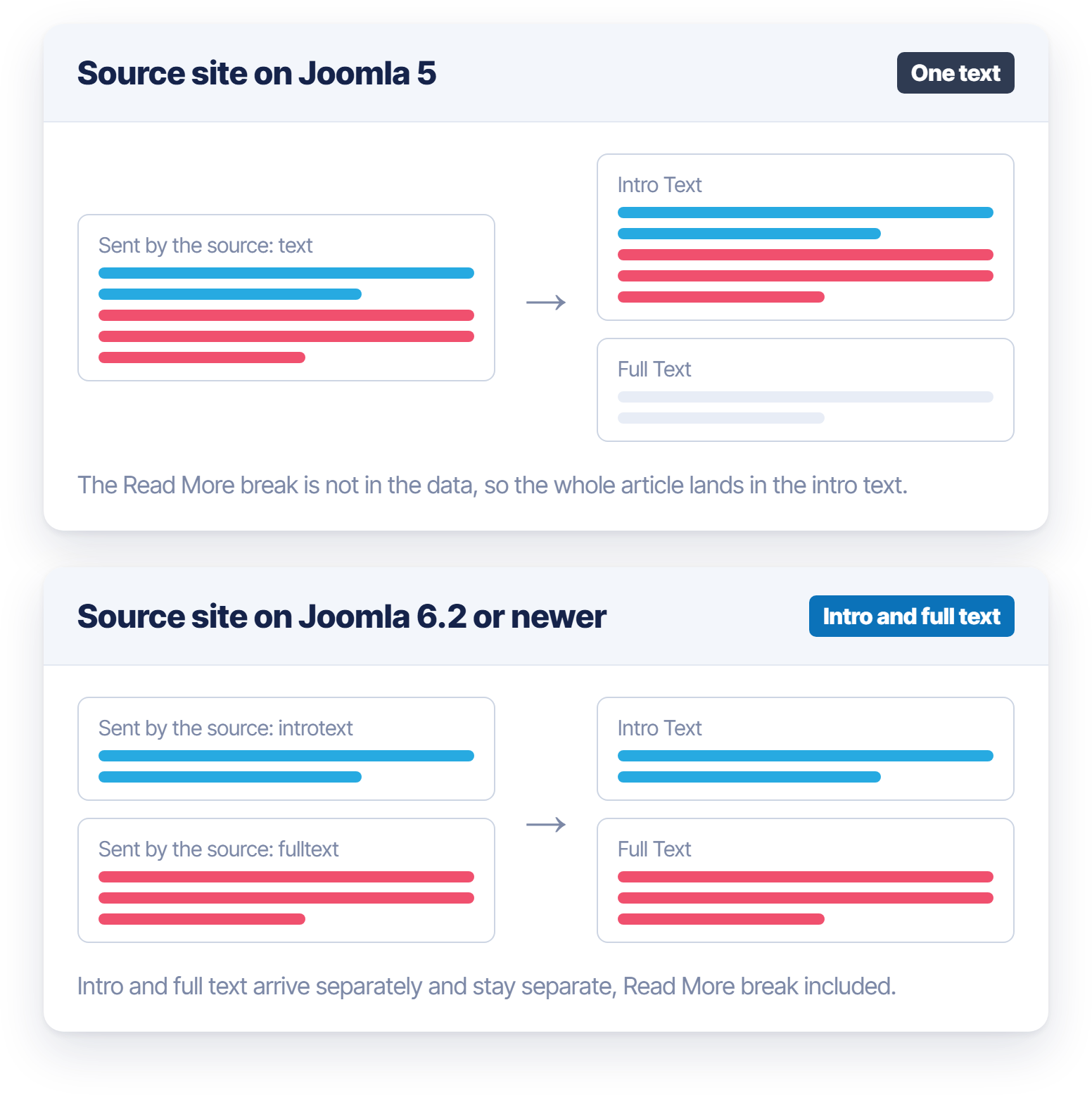
A Joomla 5 source sends one text that lands in the intro text; a Joomla 6.2 source sends intro text and full text separately
Source site on Joomla 5

Intro and full text become one text.

Joomla 5 hands over the intro and the full text as a single text, without the Read More break. The whole article lands in the intro text on the target site, and the full text stays empty. Articles, images, documents, custom fields, mappings and the filters on category, tag, language, state and featured all work.

Source site on Joomla 6.2 or newer

Intro and full text stay separate.

Joomla 6.2 hands over the intro text and the full text separately, so the Read More break is where you put it. It also makes these possible: the filter on workflow stage, incremental sync, and Schema.org data. A source on an older Joomla 6 works like a Joomla 5 source.

Everything in the box

Free to start. PRO when your sites differ.

The free edition mirrors a category of one site into a category of another. PRO is for sites that are organised differently, or that have more to carry over than text and images.

Articles on a schedule

Add a task in the Joomla Task Scheduler on the receiving site. New articles are created, changed articles are updated, unchanged articles are skipped.

Nothing on the source

The source site only needs an API token. ContentSync reads it through the Joomla Web Services API.

Images come along

Images in the text and the intro and full article images are downloaded into the same folder structure on the target site.

Dry run

Run a complete sync without writing anything. The log shows which articles would be created, updated or deleted.

Safe by default

Scripting is filtered from the article text, files are type-checked and only written where you allow, and members-only stays members-only.

Filters

Choose which articles the source hands over by several categories, tag, language and featured status.

Category, user and access mapping

Map category, author and view level IDs so every article lands in the right place with the right audience.

Custom fields

Custom field values are copied to the field with the same name, or mapped to a differently named field. Media fields come along.

Documents, audio and video

Linked files come along too, with a maximum file size you set.

Removed articles handled

When an article is gone on the source, the copy is trashed, unpublished or deleted. Your choice, per task.

Incremental sync and link rewriting

Request only what changed since the last run, copy Schema.org data and keep relative links working. Incremental sync and Schema.org need Joomla 6.2 or newer on the source.
Free vs PRO

Free or PRO, side by side

FeatureFreePRO
Articles on a schedule
✓
Nothing on the source
✓
Images come along
✓
Dry run
✓
Safe by default
✓
Filters
✓
Category, user and access mapping
✓
Custom fields
✓
Documents, audio and video
✓
Removed articles handled
✓
Incremental sync and link rewriting
✓
Pick your version

Start Free. Go PRO when it matters.

One license covers every client site you build or maintain. No per-domain fees, no domain lock.

Free

€0 forever

For personal projects and testing the basics. No account needed.

  • ✓ Create and update articles on a schedule
  • ✓ One target category
  • ✓ Filter on state and one source category
  • ✓ Images mirrored
  • ✓ Dry run and force resync
  • ✓ Logging per run

PRO

€20 / year

Unlimited sites. Renew at 75% after year one, or keep using it forever.

  • ✓ All Free features +
  • ✓ Several source categories
  • ✓ Filters on tag, language and featured
  • ✓ Category, tag, author and access level mapping
  • ✓ Custom fields with field mapping
  • ✓ Documents, audio and video
  • ✓ Removed articles handled
  • ✓ Incremental sync, Schema.org and link rewriting
  • ✓ Unlimited installations
  • ✓ 1 year updates & personal support

Joomill Bundle

€65 / year

All commercial Joomill extensions in one license.

  • Admin Checklist component PRO
  • Admin Customizer plugin
  • Article Form Builder PRO
  • Autolanguage plugin PRO
  • Client Response Gallery
  • Content Calendar module PRO
  • ContentSync Plugin PRO
  • Custom fields PRO plugins
  • Filedrop PRO
  • Openinghours module PRO
  • Price List component PRO
  • Reset Hits module PRO
  • RSForm! PRO Notion plugin
  • Secure Messages PRO
  • YOOtheme PRO Elements bundle
✓ Secure checkout✓ Instant download✓ Keeps working after your support year✓ VAT invoice for EU businesses
Jeroen Moolenschot
Personal Support

You email Jeroen. Jeroen emails you back.

“I build and maintain every Joomill extension myself. If you hit something weird, send me a message. No tier-1 bot, no escalation queue, no waiting three days for a copy-paste reply.”
Jeroen Moolenschot · Joomill · Joomla since 2006 · JED Listing Expert
FAQ

Frequently asked questions

Can't find your answer? Send Jeroen a message, you'll get a reply from the developer himself.
Does it sync in both directions?

No. Articles go one way, from the source site to the site the plugin is installed on. A change you make to a synced article on the target site is overwritten the next time that article changes on the source.

What's the difference between Free and PRO?

Free copies articles on a schedule from one source category (or the whole site) into one target category, with images, dry run, logging and every security measure. PRO adds several source categories, filters on tag, language, featured and workflow stage, mapping of categories, tags, authors and access levels, custom fields, documents and media, handling of removed articles, incremental sync, Schema.org data and links between articles that point to the local copies.

Do I have to install something on the source site?

No. ContentSync reads the source site through the Joomla Web Services API, which is part of Joomla. You only create an API token there.

My source site runs Joomla 5. What is different?

Joomla 5 hands over the intro and full text as one text, so the whole article lands in the intro text and the Read More break is lost. The filter on workflow stage, incremental sync and Schema.org data need Joomla 6.2 or newer on the source. Everything else works the same.

Can the two sites run different Joomla versions?

Yes. The site that receives the articles needs Joomla 5 or 6 and PHP 8.1 or newer. What can be copied depends on the version of the source site.

What happens when I delete an article on the source site?

In the free edition the copy stays on the target site. In PRO you choose per task: move it to the trash, unpublish it or delete it permanently.

Are custom fields created for me?

No. Create the fields on the target site first, with the same name and type as on the source. A field without a counterpart is skipped and named in the log. Supported types are text, textarea, editor, URL, integer, number, calendar, color, list, radio, checkboxes, media and media file.

Can I sync from more than one source site?

Yes. Add the task again for every source site, or for every category you want to send somewhere else. Each task has its own settings and its own schedule.

What if I start with Free and upgrade later?

Install PRO over the free edition. Your task keeps its settings, and the PRO options are added to the same form.

Is it safe to sync from a site I do not manage myself?

ContentSync assumes you might. Scripting is filtered out of the article text, files are only written inside the folders you allow and only when their type matches their extension, and an article with an unknown view level is never published to everyone.

Can I see what it will do before anything changes?

Yes. Switch on Dry Run in the task and run it. ContentSync goes through a complete run, talks to the source and logs what it would create, update and delete, without writing anything. The switch turns itself off after the run.

Are the images copied or only linked?

Copied. The images of an article are downloaded to the target site in the same folders, so the copy doesn't depend on the source site to show its pictures.

How often does it run?

As often as you set in the Joomla Task Scheduler. Once an hour suits most sites. A run where nothing changed is quick, because unchanged articles are skipped.

Does it copy categories, menus or users?

No. It copies articles with their images and, in PRO, their tags, custom fields and files. Categories, tags, fields and users must exist on the target site; ContentSync connects to them but doesn't create them.

What about articles that already exist on both sites?

ContentSync only recognises the articles it copied itself. When an article with the same alias already exists in the target category, the copy gets a numbered alias and your article is left alone. Switch on Take Over Articles With the Same Alias if the source should update those existing articles from then on.

Write it once. Let the task do the rest.

153 downloads and counting.