Spotify - Usage
After you have created the custom field you see a text field in the article.
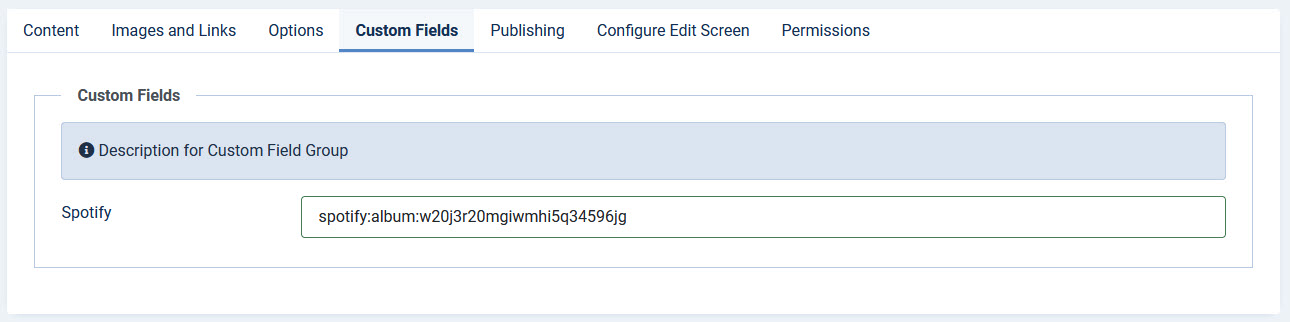
Here you enter the Spotify input
The field accepts either a Spotify share link or a Spotify URI. You can use whichever is easier:
Option A: Share link (easiest)
- Open the track, album, playlist, artist, podcast or episode in Spotify
- Select the three-dot menu (or right-click)
- Choose Share → Copy link
- Paste the link, e.g. https://open.spotify.com/track/0TDLuuLlV54CkRRUOahJb4
Option B: Spotify URI
- Follow the same Share menu
- Hold the Alt/Option key and choose Copy Spotify URI
- Paste the URI, e.g. spotify:track:0TDLuuLlV54CkRRUOahJb4
Both formats produce the same player. Links with a tracking parameter (?si=...) or a country prefix (/intl-de/) are accepted as well.
Supported Content Types
The custom field supports six types of Spotify content:
- Tracks: Individual songs
- Albums: Full albums and collections
- Playlists: Curated or user-created track collections
- Artists: Creator profiles and their catalogs
- Podcasts (shows): Full podcast series
- Episodes: Individual podcast episodes
Note: The Follow Button option has been removed. Spotify discontinued the follow-button embed in 2021, so it no longer renders. To let visitors follow an artist, link to the artist player instead, which includes a built-in follow/save control.