Edit Joomla article Element
(Joomla only)
Adds a frontend edit button for Joomla articles, visible only to users with edit permissions. It gives visitors with the right access a quick link to the article editor from the front end, and can replace YOOtheme's default floating edit button in the bottom right corner. Place it anywhere on the page; it stays hidden for visitors without edit rights.
In the YOOtheme Builder, open the element picker and look for the Joomill Extensions group of elements.

Select the Edit Button element.
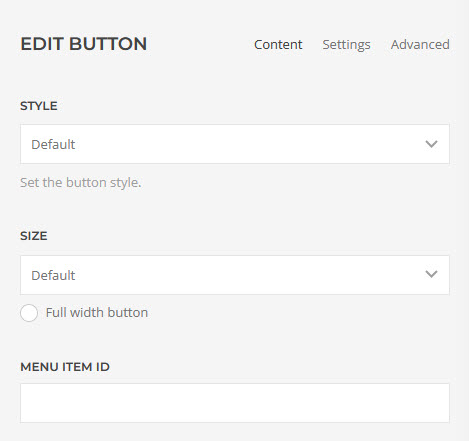
Content tab
| Button Label | Custom text for the button. Leave empty to use the default label. |
| Style | The button style: Default, Primary, Secondary, Danger, Text, Link, Link Muted or Link Text. |
| Size | The button size: Small, Default or Large. |
| Full Width | Show the button at full width. |
| Open edit screen in a new tab | Open the article editor in a new browser tab instead of the current one. |
| Menu Item ID | Set the menu item ID used for the edit page's return URL. Useful, for example, to make the edit page compatible with the Front-end Edit Helper from obix.nl. |

Settings tab
| Visibility | Choose where to show the button: Show Always, Visible or Hidden on Small (phone landscape), Medium (tablet landscape), Large (desktop) or X-Large (large screens). |
| Text Alignment | Left, Center, Right or Justify. |
| Text Alignment Breakpoint | Change the alignment at a chosen screen width. |
| Text Alignment Fallback | The alignment used below the breakpoint: Left, Center, Right or Justify. |
Demo
