Currently Open
Unlock this and other features by upgrading to Joomill Opening Hours PRO
Go PRO
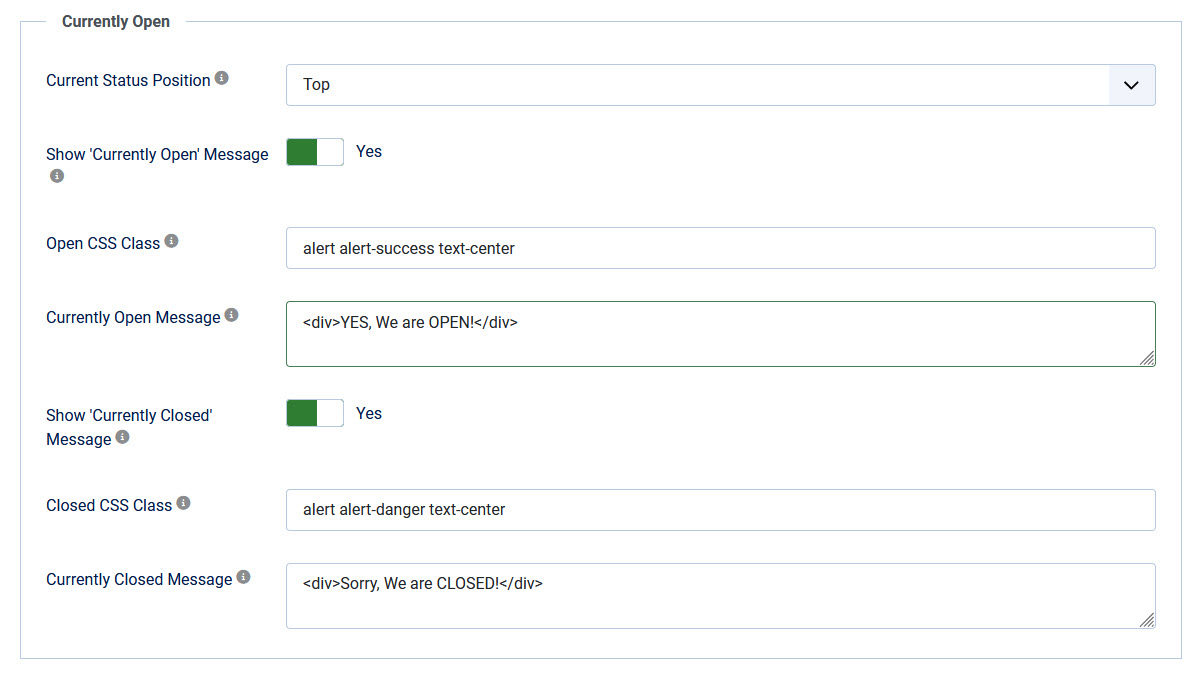
The module can show a status message when the business is currently open or closed. Enable it with Show currently open status and fill in the Currently Open Message and Currently Closed Message fields. You can use plain text or HTML, and you can style the surrounding box with the Open CSS class / Closed CSS class fields.
In the frontend it will look like:
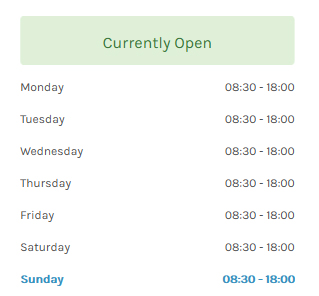
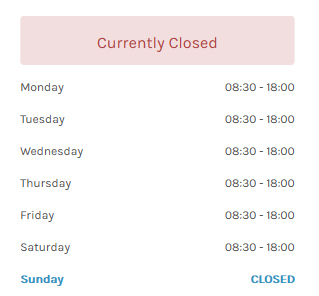
| Current Status position | Display Currently open / closed message at Top or Bottom of the module. |
| Show Currently Open Message | Show a message when your business is open. |
| Open CSS Class | Set a CSS Class for the Currently Open message. Default: alert alert-success text-center |
| Currently Open Message | Enter a message when your business is open. You might use HTML like <div>, <h4>, etc. |
| Show Currently Closed Message |
Show a message when your business is closed. Tip: for a line break use |
| Closed CSS Class | Set a CSS Class for the Currently Closed message. Default: alert alert-danger text-center |
| Currently Closed Message |
Enter a message when your business is closed. You might use HTML like <div>, <h4>, etc. Tip: for a line break use |
Live status tokens
Inside the Currently Open Message and Currently Closed Message fields you can use the following tokens. They are replaced automatically with the live status of your opening hours:
{statuslabel} |
A short status word: Open, Closed, Closing soon or On a break |
{nextchange} |
The next change as a time. When open, the closing time (for example 18:00); when closed, the next opening time with the day if it is not today (for example Mon 09:00) |
{countdown} |
A live countdown to the next change (for example in 30 min, in 2 h, in 2 days). It updates automatically in the visitor's browser, without reloading the page |
{reopensat} |
During a lunch break (between two time slots) the time the business reopens (for example 13:00); empty otherwise |
Examples
- Open message:
We are open, we close {countdown}becomes We are open, we close in 30 min - Closed message:
Closed, we open again {nextchange}becomes Closed, we open again Mon 09:00
Note: these tokens are processed by the Opening Hours content plugin, so that plugin must be installed and enabled. Without it the tokens are shown as plain text.
The countdown is always calculated in the module's configured time zone, and the logic takes regular hours, holiday/exceptional dates, overnight hours (closing after midnight) and lunch breaks (a second time slot) into account.
Closing soon and break messages
Two optional fields let you show an extra status line for specific situations. Leave a field empty to show nothing.
- Custom text when closing soon: shown as an extra line while the business is open and about to close, within the configured threshold. Tokens are allowed, for example
Hurry, we close {countdown}! - Closing soon threshold (minutes): how many minutes before closing the "closing soon" state becomes active (default: 30). This field appears once you fill in Custom text when closing soon.
- Custom text during a break: shown as an extra line during a break between two time slots (for example a lunch break), for example
On a break, back at {reopensat}.