
How to Auto-Translate Joomla Articles With AI (2026 Guide)
About half of all websites publish in English, yet only around 390 million people speak it as their first language (Statista, 2025). That gap is money walking out the door. If your Joomla site is English-only, most of the world has to struggle through it, and a lot of them simply won't.
The good news: AI translation finally got good enough to close that gap without hiring a translation agency. The catch is that "good enough to translate" and "good enough to run a multilingual site properly" are two different things. This guide walks through how to auto-translate Joomla articles with AI the right way, what it actually costs, and where you still need a human.
- 76% of consumers prefer to buy in their own language and 40% won't buy from sites in another language at all (CSA Research, 2020).
- Joomla is multilingual by default, but it makes you duplicate and link every article, menu and module by hand. That's the real chore AI can remove.
- Free API tiers (Microsoft, Google, DeepL) cover hundreds of article translations a month, so cost is rarely the blocker people think it is.
- AI gives you the first draft. A quick human review is still what separates a professional site from an embarrassing one.
Why translate your Joomla site at all?
The business case is blunt: 76% of consumers prefer to buy products with information in their own language, and 40% never buy from websites in another language (CSA Research, 2020). For a Joomla site, that's nearly half your potential audience bouncing on language alone, before they ever read your offer.
What surprises most people is the third number from that same study. 65% of consumers prefer content in their language even when the quality is poor. Read that again. Your visitors would rather have a slightly clunky Dutch or German version than a perfect English one. That single finding is why an AI-first translation workflow makes sense: get the content in front of people in their language now, polish the important pages later.
There's a supply-and-demand mismatch baked into the web too. English is the content language of roughly half of all websites (W3Techs, live data), while the people actually browsing are spread across hundreds of languages. Less competition in, say, French or Spanish content is an opening, not a chore.
Is Joomla multilingual out of the box?
Yes, and this is genuinely one of Joomla's strengths. The latest Joomla ships with dozens of accredited language packs you install straight from the backend, plus a built-in content-language system, a language filter plugin and a language switcher module (Joomla.org). No extension required to run a multilingual site. Unlike some other systems, multilingual is core, not an add-on.
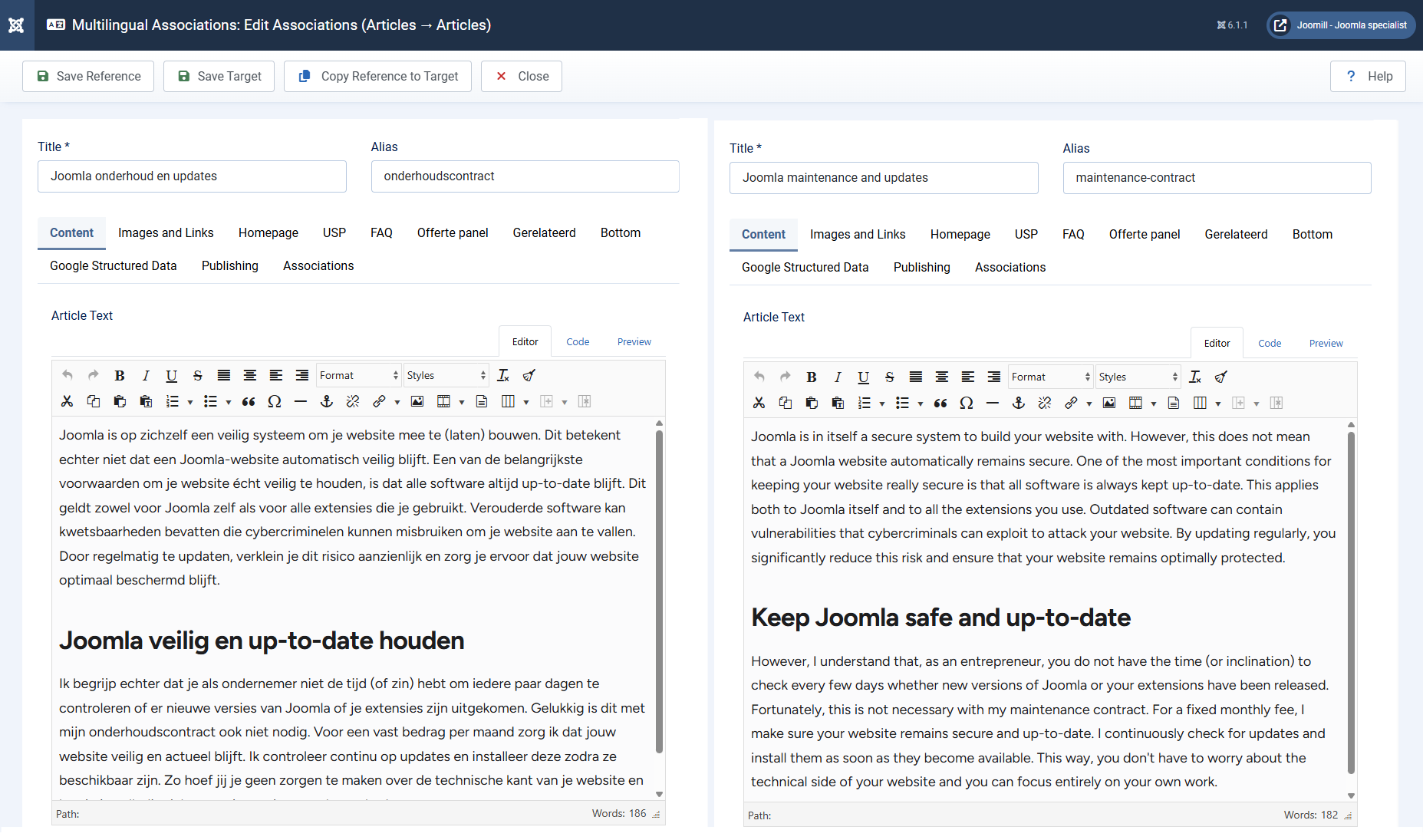
Here's the part the official docs gloss over. Joomla gives you the multilingual framework, but it expects you to fill it manually. For every article, you create a separate article per language, set its language, then open the Multilingual Associations component and link the versions together so the switcher knows they belong to each other. Then you do the same for categories. And menu items. And modules. And your tag tree.
The honest bit: Joomla's own documentation describes this workflow as "tedious" and "error-prone." They're not wrong. Miss one association and a visitor who switches language lands on a 404 or the wrong page.
For a ten-article site you'll survive. For fifty articles in three languages you're looking at hundreds of manual steps, and every new article restarts the cycle forever. This is the chore AI translation is actually here to remove, not just the typing.
Three ways to auto-translate a Joomla website
There are three realistic routes to a translated Joomla site, and they differ less in translation quality than in where your content lives and who owns it. Picking the wrong model is the mistake that costs you later, so it's worth thirty seconds of thought.
1. Core multilingual, translated by hand. Free, fully native, fully yours. Also the most labour-intensive. Fine if you have three pages or a translator on staff.
2. Cloud proxy services (the GTranslate-style widgets and SaaS proxies). Fast to switch on. The trade-offs: free JavaScript widgets translate on the fly in the browser, which means search engines never index those translations, so you get zero SEO value. Paid proxy tiers host your translated pages on their infrastructure. The day you stop paying, the translations vanish, because they were never in your database.
3. Joomill Autolanguage using your own API keys. A plugin translates content inside Joomla, writes it into Joomla's own tables, and uses an AI engine you connect with your own key. You own the translations, they're indexable, and there's no monthly proxy fee. This is the route this guide focuses on, because it's the only one that's both automated and genuinely yours.
| Core, by hand | Cloud proxy SaaS | Joomill Autolanguage | |
|---|---|---|---|
| Setup speed | Slow | Fast | Fast |
| Translations indexable for SEO | Yes | Often no (free tiers) | Yes |
| Content stored in your Joomla DB | Yes | No | Yes |
| Ongoing fee | None | Monthly, forever | API usage only |
| Survives if you cancel | Yes | No | Yes |
How to auto-translate Joomla articles with AI, step by step
The whole point of an AI workflow is that you write once and the translation happens the moment you save, with associations created for you. Using a native plugin like our AutoLanguage plugin for Joomla, the setup is a five-minute job and here's how it goes.
Step 1: Install your content languages
In the Joomla backend, install a language pack for each target language, then create a Content Language for each one and publish the Language Filter plugin. This is standard Joomla setup, the same foundation every method needs. If you've never done it, the Joomla page translation quickstart covers the basics.
Step 2: Pick an AI translation engine
Decide which engine will do the translating. AI translation models now top the field's own benchmarks: the WMT24 research conference concluded that LLM-based systems lead machine translation quality, in a paper titled "The LLM Era Is Here but MT Is Not Solved Yet" (WMT24, 2024). In plain terms, the output is good. More on choosing between them below.
Step 3: Connect your API key
Create an account with your chosen provider, generate an API key, and paste it into the plugin settings. You're paying the AI provider directly with no markup, and most providers have a free tier that covers a surprising amount (cost math is its own section below). You can store keys for several engines and switch per project.
Step 4: Save the article and let it clone
Write your article in your main language exactly as you always do. When you hit Save, the plugin clones the article, sends the text to your AI engine, creates the translated versions, and registers the association in Joomla's native table automatically. No second interface, no separate translation screen. For a whole back catalogue, a batch mode translates hundreds of articles in one pass instead of one save at a time.
Step 5: Check the things translation usually breaks
This is where most tools quietly fail and where you should spend your attention. After years of building and supporting translation tooling for Joomla, these are the three things I see break most often, and they're never the body text:
- Internal links. A link to your English contact page should now point to the translated contact page, not the English one. A good plugin rewrites these automatically; if yours doesn't, you'll be fixing 404s by hand.
- SEO fields. Browser title, meta description, URL alias, image alt text and captions all need translating, or your translated pages never rank in local search.
- Attached items. Categories, menus, modules, tags and mail templates need their own translated, associated versions too.
What does AI translation actually cost?
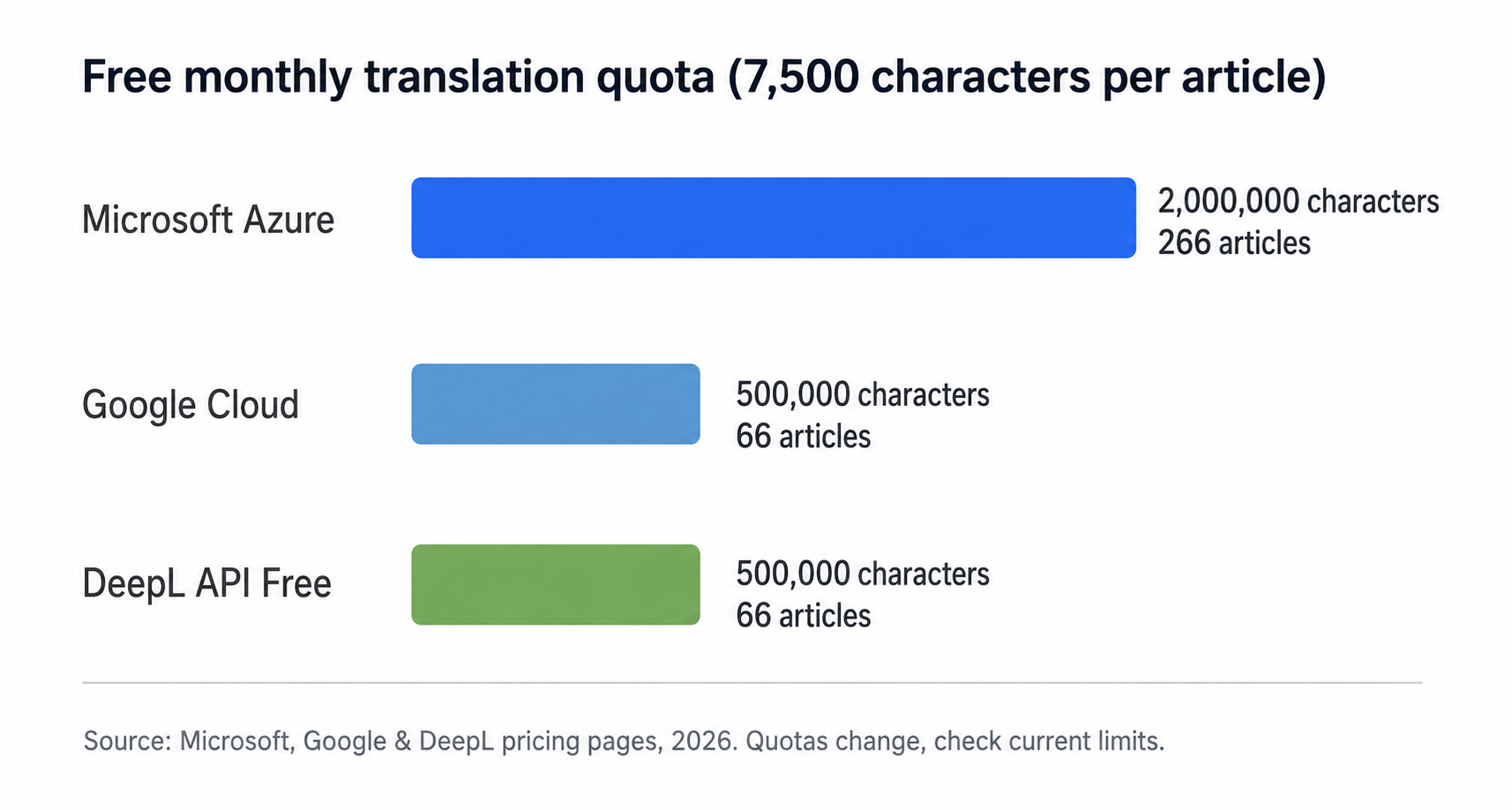
Less than almost everyone assumes, which is the detail no competing guide bothers to calculate. The cost lives with the AI provider, not the extension, and the free tiers are generous. At the time of writing, Microsoft Azure Translator's free tier covers 2 million characters per month, while Google Cloud Translation and the DeepL API each cover 500,000 characters per month free (Microsoft, Google, DeepL). Always check the current quotas, because providers adjust them.
Let's turn that into something concrete. A typical 1,200-word article is roughly 7,500 characters. So Microsoft's 2-million-character free tier covers around 260 article translations a month at no cost. Even the 500,000-character tiers handle about 65 articles a month free. For most Joomla sites, that's the entire content library translated into a new language without spending a cent on translation.
Worked example: A 50-article blog is about 375,000 characters. Translating it into three languages is roughly 1.1 million characters total. That fits inside a single month of Azure's free tier, with room to spare.
Compare that to doing it by hand. A professional translator manages about 2,000 to 3,000 words a day at typical rates of $0.10 to $0.30 per word (Smartling, 2025). That same 50-article blog, per language, is weeks of work and a four-figure invoice. The AI version is an afternoon and pocket change.
Which AI engine should you pick?
There's no single winner, which is exactly why being able to switch engines matters. Each provider has a sweet spot, and a plugin that supports several lets you match the engine to the job and dodge vendor lock-in.
For raw accuracy and tone control, DeepL is the usual pick. In DeepL's own blind tests with linguists, competing systems needed roughly two to three times more edits to match its output (DeepL, 2024). Treat that as a vendor claim, but it tracks with what most users report, especially for European language pairs and its formal/informal controls.
The large language models, OpenAI's GPT models, Anthropic's Claude, Google's Gemini and DeepSeek, shine on context and brand voice, handling nuance and marketing copy better than older machine translation. DeepSeek in particular delivers strong quality at the lowest cost per character. Google Translate and Microsoft Azure remain the speed-and-reach champions with the most generous free tiers. The practical answer: start on a free tier, and switch engines for the pages where tone really matters. Our AutoLanguage plugin connects to all of these so you're never stuck with one.
Don't skip the human review
AI gives you a strong first draft, not a finished one, and treating it as finished is the one shortcut that backfires. Even professional translators now lean on machine translation as standard: the EU-backed ELIS 2025 survey found machine translation usage passed 50% for the first time, used in about 54% of projects (ELIS, 2025). The industry standard isn't "AI or human." It's AI first, human review after.
So where do you spend your review time? Not everywhere. Your homepage, your top landing pages and your checkout or contact flow deserve a careful read by a native speaker. A three-year-old blog post buried in your archive does not. Remember the CSA finding that 65% of people accept imperfect content in their language over perfect content in a foreign one. That's your permission to publish the AI draft for the long tail and polish only what earns the attention.
A short review checklist that catches most issues: brand and product names left untranslated on purpose, idioms that went weird, formal versus informal address for languages that distinguish them, and any text baked into images that the translator never saw.
Keeping AI translations SEO-friendly
Translation only helps your rankings if search engines can actually read the translated pages, and this is where the "route" you chose in section three comes back to bite or reward you. Native and core-multilingual setups give each language its own real, crawlable URL, which is exactly what Google wants. The free browser-widget approach does the opposite: it translates in JavaScript on the fly, so there's no separate page for Google to index and no SEO benefit at all.
Three things keep your multilingual Joomla site healthy in search. Each language needs its own indexable URL, which Joomla's core system gives you. Each page set needs hreflang annotations so search engines know which language version to serve to whom. And your translated SEO fields, those titles, descriptions and aliases from Step 5, need to actually be translated, because an English meta description on a Dutch page is a wasted ranking signal. Get those three right and every language version compounds your organic reach instead of diluting it.
Ready to make your Joomla site multilingual?
If you want the workflow in this guide without the manual association-juggling, that's exactly what the AutoLanguage plugin does. It clones and translates your articles, categories, menus, modules and tags, rewrites internal links, translates your SEO fields, and writes everything into Joomla's own tables using the AI engine you choose. One license covers all your client sites, and it's built for the latest Joomla.
Take a look at the AutoLanguage plugin or read the full documentation to see how it fits your setup.
Frequently asked questions
Can Joomla translate articles automatically without a plugin?
Not on its own. The latest Joomla provides the full multilingual framework, language packs, content languages and a switcher, but you create and link each translated article by hand (Joomla.org). To translate the actual content automatically you need an AI translation extension or service on top of that core system.
How much does it cost to auto-translate a Joomla site with AI?
Often nothing to start. Free API tiers cover roughly 2 million characters a month with Microsoft and 500,000 with Google or DeepL (Microsoft, 2026). At about 7,500 characters per article, that's dozens to hundreds of article translations a month before you pay the AI provider anything.
Is AI translation good enough for a professional website?
For a first draft, yes. AI translation systems now lead machine-translation quality benchmarks (WMT24, 2024), and even professional translators use machine translation in about 54% of projects (ELIS, 2025). Have a native speaker review your most important pages before relying on them.
Will auto-translated Joomla pages hurt my SEO?
Only if you use the wrong method. Browser-widget translations aren't indexed and add no SEO value. Native translations stored in Joomla with their own URLs and hreflang tags are fully crawlable, so each language version expands your organic reach instead of competing with the original.
Which AI engine is best for translating Joomla?
It depends on the language and budget. DeepL leads on accuracy for European languages, the large language models handle tone and context well, and Google and Microsoft offer the largest free tiers. A plugin that supports several engines lets you switch per project rather than committing to one.
The takeaway
Making your Joomla site multilingual is no longer a translation-agency-sized project. The core multilingual system has been there for years; what changed is that AI can now fill it with quality content for the price of an afternoon and a free API key. The winning move is simple: let AI handle the first draft across your whole site, then spend your human review time only on the pages that earn it.
The one decision that matters most is the route. Keep your translations inside Joomla, indexable and yours, rather than rented from a proxy you'll keep paying forever. If you'd rather skip the manual cloning entirely, the AutoLanguage plugin automates the whole flow, and you can browse the rest of the Joomla extensions while you're there.